← Back to Help Center
Getting Started
Learn how to use the canvas
Adding Nodes to Your Canvas
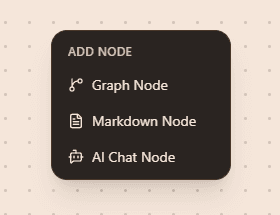
The canvas is your infinite workspace for building AI workflows. To add nodes, simply right-click anywhere on the canvas to open the node menu.
From the menu, you can select different node types to add to your workflow. Each node represents a specific action or AI feature.
Connecting Nodes
Once you have multiple nodes on your canvas, you can connect them by dragging from one node's output handle to another node's input handle. This creates a flow of data between nodes.
Next Steps
Now that you know how to add nodes, the next step is to set up an AI provider. You can either set up Ollama for local AI models, or set up OpenRouter for cloud-based AI models.